
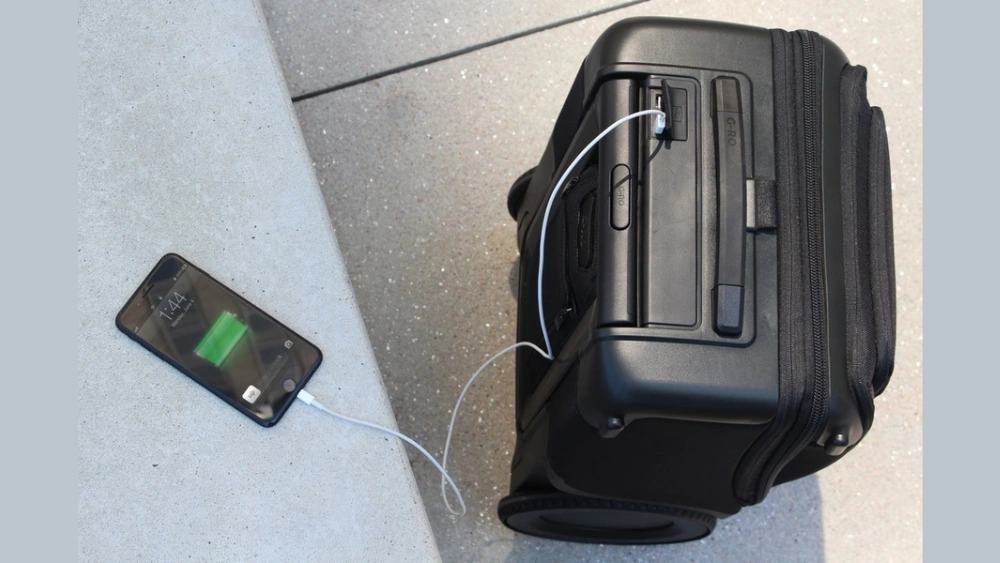
Imagine never having to hunt for a power outlet while waiting at the airport or stuck on a long layover. Your carry-on luggage with a USB charging slot makes this possible.
It’s not just a bag—it’s your personal power bank on wheels. If you want to stay connected, keep your devices charged, and travel smarter, this innovation is exactly what you need. Ready to discover how this simple feature can transform your travel experience?
Keep reading to find out why upgrading your carry-on could be the best decision you make before your next trip.

Credit: www.ebay.com
Benefits Of Usb Charging Luggage
Carry on luggage with a USB charging slot offers a smart way to keep devices powered. It helps travelers stay connected without extra hassle.
This type of luggage includes built-in ports to charge phones, tablets, and other gadgets on the move.
Convenience On The Go
USB charging luggage lets you charge devices while walking or waiting. You do not need to find a power outlet.
This convenience is perfect for busy travelers and long trips.
Stay Powered Anywhere
The luggage’s USB slot connects to a power bank inside. This setup keeps your phone or tablet charged anywhere.
You can stay powered during flights, train rides, or airport waits without stress.
Reduce Carrying Extra Chargers
Using USB charging luggage means fewer cables and chargers to carry. This lowers the weight and clutter in your bag.
- Less space used for cords
- Easier to organize your items
- Less chance to forget a charger
Key Features To Look For
Choosing carry on luggage with a USB charging slot can make travel easier. This type of luggage lets you charge devices on the go.
Look for important features that improve convenience, safety, and durability. These features help you pick the best luggage for your needs.
Built-in Power Banks
Many carry on bags have built-in power banks to charge phones and tablets. Check the power bank capacity and compatibility with your devices.
- Capacity in mAh (higher means more charges)
- Number and type of USB ports
- Easy access while traveling
- Removable or fixed power bank
Durability And Material
Strong materials protect your belongings and last longer. Look for water-resistant fabrics or hard shells.
| Material | Pros | Cons |
| Polycarbonate | Lightweight, strong | Can scratch |
| ABS Plastic | Affordable, rigid | Less durable |
| Nylon Fabric | Flexible, water-resistant | Can tear |
| Polyester Fabric | Durable, affordable | Less water-resistant |
Size And Weight Considerations
Check the luggage size to fit airline rules. Lightweight bags are easier to carry and store.
- Measure dimensions before buying
- Know your airline’s carry on limits
- Choose lightweight materials
- Consider bags with expandable compartments
Security Features
Security protects your belongings. Look for locks, zippers, and anti-theft features.
| Feature | Description |
|---|---|
| TSA-Approved Locks | Allow security checks without damage |
| Anti-Theft Zippers | Prevent easy opening by others |
| Hidden Pockets | Keep valuables safe and out of sight |
| Cut-Resistant Material | Stops thieves from slashing the bag |
Top Brands And Models
Carry on luggage with USB charging slots is popular among travelers. These bags help keep devices charged on the go.
Many brands offer models with built-in USB ports. These come in various sizes and styles to fit different needs.
Popular Usb Luggage Options
Some brands focus on quality and tech features. Samsonite, Away, and Travelpro are well-known for USB luggage.
- Samsonite Pro DLX 5 – Durable with a USB charging port
- Away The Bigger Carry-On – Stylish with a removable battery
- Travelpro Maxlite 5 – Lightweight and USB-equipped
- Coolife Luggage – Affordable with USB charging slot
- Briggs & Riley Sympatico – Premium with tech-friendly design
Price Ranges And Value
USB carry on luggage comes in many price ranges. You can find models under $100 to over $500.
More expensive bags usually offer better materials and bigger batteries. Budget options still provide basic USB charging.
- Budget: $70 to $150 – Simple USB ports, less durable
- Mid-range: $150 to $300 – Good quality, built-in batteries
- Premium: $300 and above – High-end materials, advanced features
Customer Reviews And Ratings
Customers often praise USB luggage for convenience. Many say it helps keep devices ready during trips.
Some users mention battery life and weight as key factors. Checking reviews helps find the best fit for travel needs.
- Positive reviews highlight charging convenience and durability
- Negative reviews mention heavy weight or short battery life
- High ratings often go to brands with good warranty service

Credit: www.ebay.com
Packing Tips For Smart Travelers
Carrying luggage with a USB charging slot makes travel easier. It lets you charge devices on the go.
Smart packing helps you stay organized and ready. Use your luggage’s features to save time.
Organizing Electronics
Keep all your electronics and cables in one place. Use small pouches or cable organizers inside your luggage.
Place your power bank near the USB charging slot for easy access. This helps when you need to charge quickly.
- Use cable ties or wraps to avoid tangles
- Label chargers for each device
- Store small gadgets in clear bags
Maximizing Charging Efficiency
Charge your devices while walking or waiting. The USB slot in your luggage helps you keep devices powered.
Use high-quality cables to improve charging speed. Avoid using damaged or old cables that slow charging.
- Charge your power bank fully before travel
- Turn off unused apps to save battery
- Use airplane mode to speed up charging
Airport Security Tips
Keep your electronics easy to reach when passing security. Remove power banks if asked.
Make sure your luggage is unlocked or TSA-approved. This helps security checks go smoothly.
- Pack cables and devices neatly for quick inspection
- Keep chargers and power banks in carry-on bags
- Follow airport rules for battery size limits
Maintenance And Care
Taking good care of your carry on luggage with a USB charging slot keeps it working well. Proper maintenance helps the battery last longer and keeps the case clean.
Follow simple tips to charge, clean, and fix common problems. This guide makes it easy to care for your smart luggage.
Charging The Luggage Battery
Charge the luggage battery regularly to keep it ready. Use the original charger that came with the luggage. Avoid using cheap or wrong chargers.
Do not overcharge the battery. Unplug it once fully charged to prevent damage. Charge the battery in a dry place at room temperature.
- Use the correct charger for your luggage
- Charge in a cool, dry place
- Unplug when the battery is full
- Charge the battery before long trips
Cleaning And Storage
Keep the luggage clean to look new and work well. Wipe the outside with a soft cloth and mild soap. Avoid harsh chemicals that may damage the surface.
Store the luggage in a cool, dry place when not in use. Remove the battery if you will not use the luggage for a long time. This helps prevent battery damage.
- Use a soft, damp cloth for cleaning
- Do not soak the luggage in water
- Keep away from direct sunlight during storage
- Remove the battery for long-term storage
Troubleshooting Common Issues
If the USB charging slot does not work, check the battery level first. Make sure the power switch is on. Try using another cable or device to test the port.
For battery problems, recharge fully and reset if possible. If the luggage does not charge, inspect the charging port for dirt or damage. Contact support if the problem continues.
- Check battery charge and power switch
- Test with different cables and devices
- Clean the charging port gently
- Reset the battery if available
- Seek help if issues persist

Credit: www.amazon.com
Frequently Asked Questions
What Is A Carry On Luggage With Usb Charging Slot?
A carry on luggage with USB charging slot includes a built-in port. It allows you to charge devices on the go. You simply connect a power bank inside and plug your device into the external USB port. It’s convenient for travelers needing power access.
How Does The Usb Charging Slot In Luggage Work?
The USB charging slot connects to an internal power bank pocket. You place a charged power bank inside the luggage. The external USB port allows easy device charging without opening the bag. This system provides a practical way to charge devices during travel.
Are Carry On Bags With Usb Chargers Airline Compliant?
Most carry on bags with USB chargers meet airline size rules. Ensure your luggage dimensions comply with the airline’s carry on limits. The USB charging feature does not affect airline compliance. Always check specific airline policies before traveling.
Can I Charge Multiple Devices With The Luggage Usb Port?
The luggage USB port usually supports charging one device at a time. To charge multiple devices, you need a power bank with multiple USB outputs. Some bags offer dual ports, but charging depends on the power bank capacity inside.
Conclusion
Carry on luggage with a USB charging slot makes travel easier. Keep your devices powered without searching for outlets. It saves time and reduces stress during trips. Choose luggage that fits your needs and style. Stay connected wherever you go.
Small features can make a big difference in travel comfort. Remember, smart packing helps you enjoy your journey more. A useful charging slot adds convenience on the move. Travel light, stay charged, and feel ready for anything.